Don’t have to mention the panic that kicks in when you have forgot or misplaced your root user password. Like most other operating systems, openSUSE helps you to recover or reset the root password from the console.
Please try the following to reset/recover root password. This should work on openSUSE 11.0 & openSUSE 10.x (tested on openSUSE 10.3):
1. Boot the system and select the normal boot menu from the list. Once selected, in the “Boot Options” box type
“init=/bin/bash” if you are using GRUB Boot loader
“linux init=/bin/bash” if you are using LILO Boot Loader
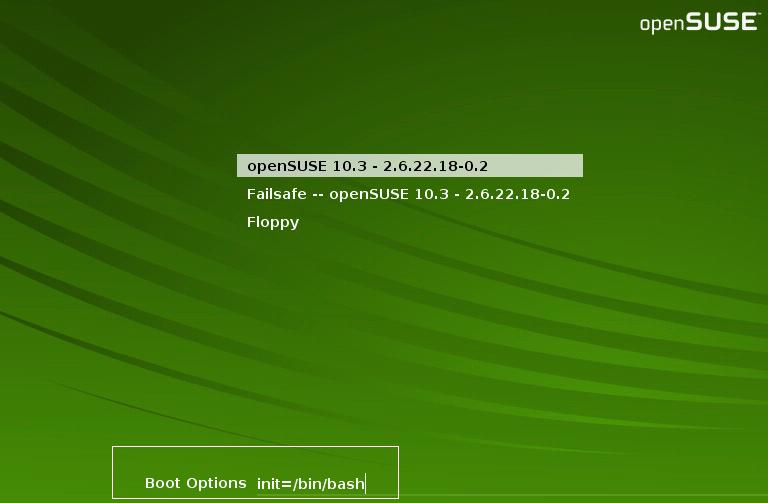
This will launch you straight into a Bash shell prompt which comes up even before the Single User mode loads and has the “/” root file system mounted.
Do a mount command to check if the root file system “/” is mounted as Read-Write. In my system, it indeed mounted as Read-Write.
opensuse11:~ # mount
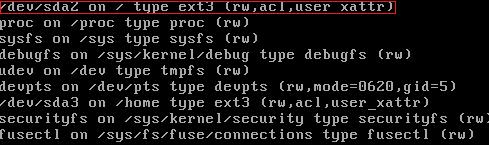
Else, you may need to remount the “/” file system with read-write as follows:
opensuse11:~ # mount -o remount,rw /
Now, simply type the passwd command and enter a new password:
opensuse11:~ # passwd
Changing password for root
New Password:
Reenter New Password:
Password changed
Reboot the system and you are back in business.
opensuse11:~ # reboot
This should help!
I’m astonished!
I tried and worked. Thanks a lot!
But where is the legendary Linux inviolability if anyone in 3 simplest steps can reset root password?
I’ll appreciate an answer very much. Thanks!
ellevi
Since the reset is done at boot time, you would have to have physical access to the machine to be able to perform this task. So security is still unaffected, unless you leave your front door open:)
Mike
If you need additional security against physical attacks at boot time, then GRUB allows you to set a boot loader password, which prevents settings from being changed.
That way you will have to boot from a CD and reset that first, but you can prevent that as well by using a BIOS password. Then you have to physically get inside the machine and remove the battery to reset that.
Wow! Thanks..
I agree with Michael and Richard until the scenario is an opensuse system on a well guarded server.
But what about an opensuse on a notebook that can easily be lost or stolen?
still good for opensuse 11.1 also…
actualy this procedure should be okay for just about any linux that boots from GRUB or LILO.
@Ellevi: for protecting a notebook, you essentially need to protext the data on your harddrive from being read by any operating system (once someone has your PC, there’s nothing to stop them cracking open the box taking out the drive and putting it in their own machine).
Take a look at openSUSE’s hard-drive encryption tools, and the hard-drive encryption how-to. For something really secure, you’re going to have to store the encryption key on a removable medium kept separate from the notebook and enter a passphrase each time you boot. There is no other way for the truly paranoid…
My work (big IT company) uses Pointsec for PC (Windows XP) — it decrypts the drive upon boot and relies on Windows security to avoid reading the drive unless you can log into Windows. It’s good enough, but not fool-proof either, since there are ways to bypass Windows security too…
Thank you very much. I needed this 1st boot since i messed up the passwd! doh! 😀
hello
i have a root but i cant change the password what should i do everytime i change the password it says
Changing password for user root.
New password:
Retype new password:
passwd: all authentication tokens updated successfully
but when i login to the same passwrd still working can u email me for my problem i need solution tnx very much 🙂
Hello all,
When I try the command #mount -o remount,rw / it was executed successfully but when I type passwd it is throwing me an error message “passwd: user not known to the underlying authentication module” Please guide me on what to do next.
Regards,
Blue
When I enter init=/bin/bash in boot options but is still boots to the GUI and ask for root password.
what am I doing wrong?
Thanks for this! Saved me a big headache.
Hi,
I tried this stuff, but before I start to type “mount” the system said that:
mount: can't find /root/proc in /etc/fstab or /etc/mtabplease be advise.
thank you.
Worked like a charm, your a genius.
thanks it is working for v11.1. ^_^
Zürich, 15. Mai 2010
Hallo
Leider ist das Zurücksetzen und Wiederherstellen des Passwortes noch nicht gelaufen, ich habe von dem System wenig
praktische Erfahrungen und traue mich nicht in der Konsole eine Zeile zu schreiben. Ich habe kaum eine detailierte Ahnung, wie das System läuft.
Gruss
It works. Thanks very much. You saved me the pain of reinstallation and a reconfiguration of my linux box.
It worked in 11.3 as well. Thanks!
thanks for the info. I’ve managed to change their root password for my servers
It worked fine. Thank you very much.
Many many thanks.I liked it.
my problem is that when it finished loading after i insert the command init=/bin/bash… at first it asks me to login.. and since i dont have root passwd it doesnt leave me recover password… what can i do?
Thanks Heaps, just tried successfully on openSUSe 11.2
Steve.