How to install & configure Xen Virtualization in openSUSE 11.0
Posted by admin on July 30th, 2008
Virtualization cannot be that simpler than in openSUSE 11.0. In openSUSE 11.0, Xen Virtualization ins pre-built and all it takes is a few clicks away from up and running with Virtualization in no time. Xen is a virtual machine monitor for x86 that supports execution of multiple guest operating systems with unprecedented levels of performance and resource isolation. This package contains the Xen Hypervisor.
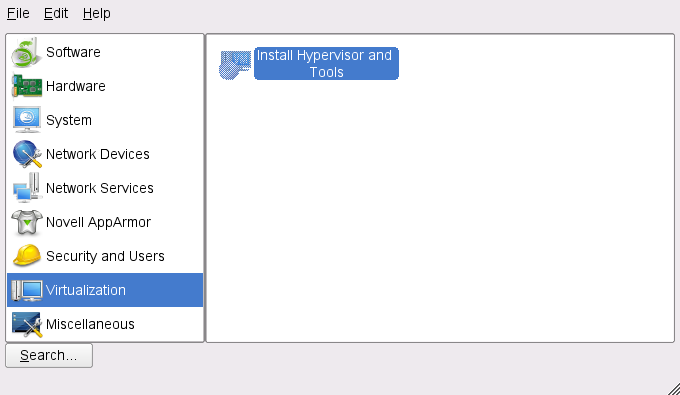
To install Xen Virtualization in openSUSE 11.0,
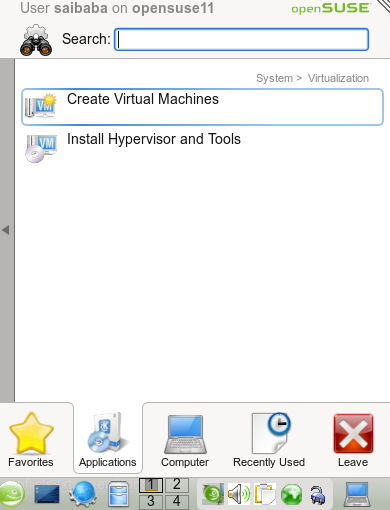
From the KMenu, click Applications - System - Virtualization - Install Hypervisor Tools

This will start the installation and will show a list of packages to be installed. Click Install
This will start downloading the Xen Virtualization packages and the modified kernel for Xen virtualization.
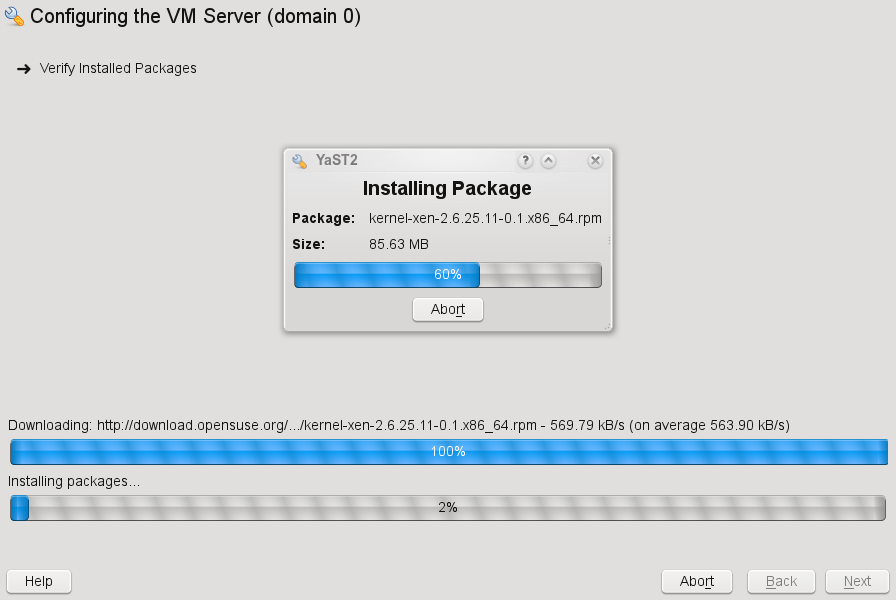
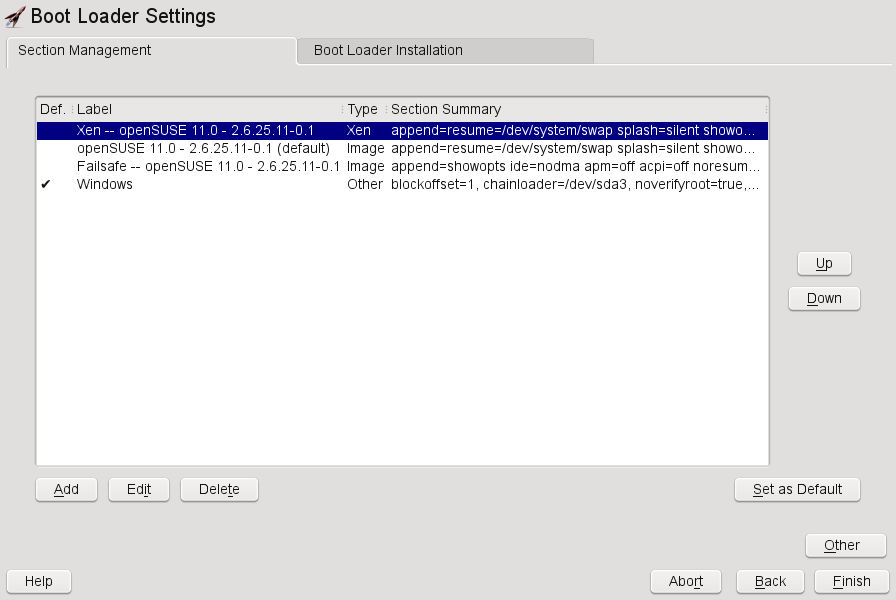
Once the installation is completed, it will prompt you to reboot and start the system by selecting the openSUSE option with Xen kernel from the list. To confirm the boot loader entry in GRUB, click KMenu - Computer - YaST - System - Boot Loader and you should see the “Xen — openSUSE 11.0 - 2.6.25.11-0.1″ in the list.
Reboot your PC and select “Xen — openSUSE 11.0 - 2.6.25.11-0.1″. This will boot openSUSE with the modified kernel which supports Xen virtualization and everything else loads normally. Now, from the KMenu - Applications - System - Virtualization - “Create Virtual Machines” to start creating virtual machines.
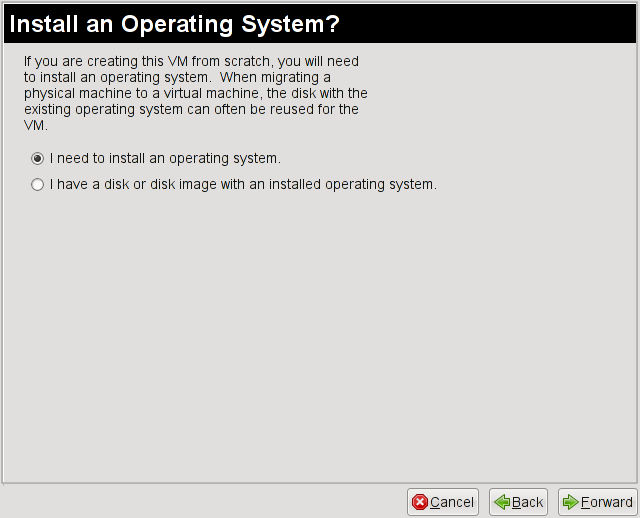
From the wizard, click Forward from the welcome screen and select “I need to install an operating system” or if you already had a Disk image select the option to select a disk or disk image and click Forward.
Select the type of operating system and click Forward.
Select the Virtualization type and click Forward. The default is “Paravirtualisation”
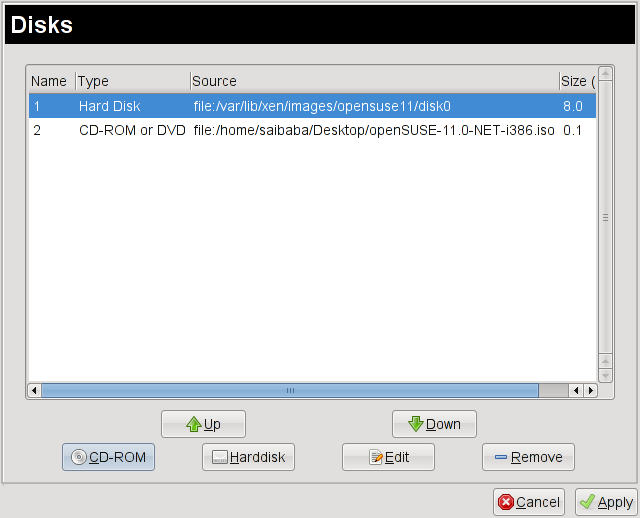
This brings up the final summary. Any change to any settings can be changed from here. For instance to add a CDROM or a ISO images, click Disk and then click CDROM and add the CDROM drive or the ISO image.
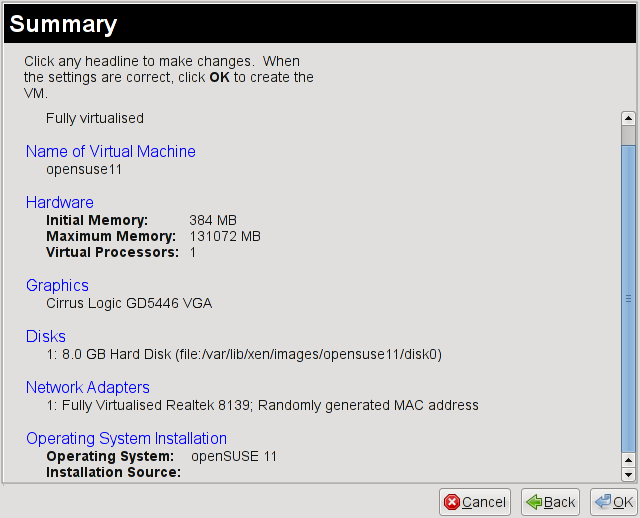
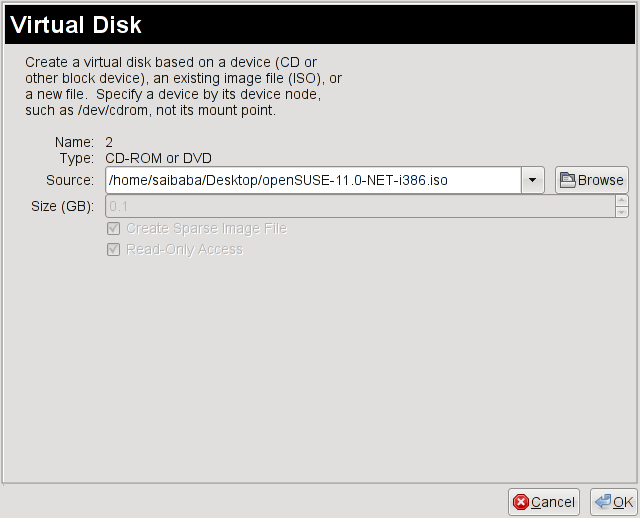
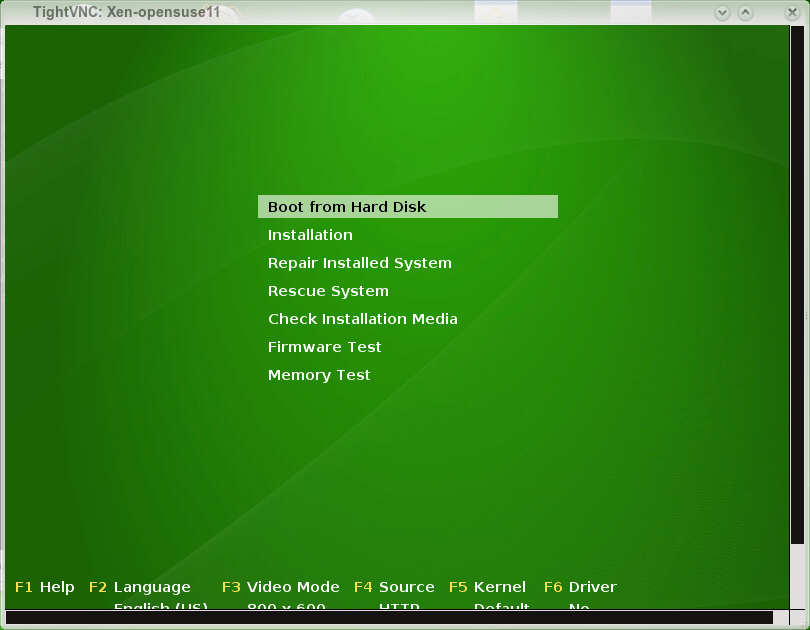
When all the changes are complete. Xen launches the Xen image under a TightVNC session. Now, you are up and running with Xen Virtualization in openSUSE 11.0


August 2nd, 2008 at 2:34 pm
Hmm, it’s not so easy if the hardware is not fully supported by Xen. I have ACER AMD64 dual core and yet I wasn’t able to successfully build a single virtual system on it using Xen (no problems with VMware or Virtual Box).
I had numerous issues booting to Xen kernel (for example with USB storage) and once booted, the only option available was paravirtualization and full virtualization wasn’t an option.
All and all, I would venture out and say that Xen is not fully mature yet for the big time, even though, some try to push and make you want to believe it is so.
August 2nd, 2008 at 5:02 pm
@Bolek: its even easier than this if you install it from the beginning
I have several xen guests all paravirtualized that didn’t take that much effort to get up and running. XEN has worked great for me on my servers. Almost 100% uptime since I installed them.
6:20pm up 246 days 18:11, 1 user, load average: 0.13, 0.05, 0.01
I think its ready, at least for my purposes. I’m not saying that your average joe can do it with just click buttons and checking checkboxes. At the same time, I don’t believe that it necessarily should be that way. Would you hire an average joe to setup and maintain an enterprise data center? I should clarify that i don’t really view xen as a desktop solution.
August 2nd, 2008 at 7:48 pm
I have heard the “average Joe” argument many times. However, knowing current trend in IT industry it no longer holds water. Unless you have tools to easily configure guests, reconfigure them, migrate and so on, it will be always on the fringes of enterprise deployment. It goes nowhere near the ease of use when you compare it to VMware. And I am not advocating for one or the other. I merely point out the obvious. Part of growing is the recognition of strengths and weaknesses. Management of Xen is still its Achilles heel (providing you are lucky enough to make it work).
What might work for you, might not work in the enterprise. Again, I hope you read my comment about Xen kernel having problems with off the shelve hardware. It’s not an ‘average’ Joe issue. That was my point.
I am glad that it is working for you, but this is not the argument nor the criteria that makes it ready for everyone else.
August 5th, 2008 at 6:12 am
I’ve followed all the steps outlined but when i click ok after selecting the OS (OpenSuSE 11), i get an alert that there’s not enough memory. What to do?
August 5th, 2008 at 7:13 am
I think you should check the space on your /var FS
August 6th, 2008 at 12:44 am
If I have the Nvidia and atl2 driver modules configured (as installed via Yast), how easily can I create a Xen kernel with both Nvidia and atl2 modules?
Is there a shortcut, or I will have to do it the manual (hard :)) way?
August 6th, 2008 at 3:05 pm
I used the same process described above and tried to configure a winxp guest OS with the option “I have a disk or disk image with an installed OS”. Basically my pc is a dual-boot system with opensuse installed on one drive (/dev/sdb) and winxp installed on another drive (/dev/sda). On opensuse the winxp partition (NTFS) is mounted on /mnt/windows. So, in the virtualization “Disks” option, I specified “file:/mnt/windows” and clicked ok. This totally destroyed the winxp partition. Now my pc just does not boot from winxp. On top of that the winxp drive can’t even be mounted as a data drive become the filesystem itself is damaged. Why has opensuse released such a buggy tool that can end up destroying the user’s windows OS?
August 9th, 2008 at 12:25 pm
[...] live-CD. On linux, my winxp NTFS partition is mounted on /mnt/windows. I followed the tutorial in How to install & configure Xen Virtualization in openSUSE 11.0 | SUSE & openSUSE to configure a guest OS using the xen-based virtualization feature available in YAST2. Basically, [...]
August 10th, 2008 at 8:46 am
hi all,
i used exactly the same process described above, but when i apply :
” the installation source is unusable
/boot/i386/vmlinuz-xen
/boot/i586/vmlinuz-xen
/INDEX.gz”
I’m using the same iso that i’ve used for installing my suse
thank you
August 10th, 2008 at 8:56 am
Are you mounting an DVD or a CD ISO image? Is it a 64bit or a 32bit OS iso?
August 11th, 2008 at 2:24 pm
hi,
i’m mounting a cd 32bits os iso image.
thx again.
August 13th, 2008 at 8:30 am
Hello,
Is opensuse 11 support paravirtualisation?
also, I try to run Opensuse 11 on SLES 10sp1 but I don’t have the right os type choice…
( I only see opensuse, not opensuse 11)
How could I Update the list?
Thanks!
August 19th, 2008 at 1:00 pm
Hello,
I did everything written above but when; Quote [ Reboot your PC and select “Xen — openSUSE 11.0 - 2.6.25.11-0.1″. This will boot openSUSE with the modified kernel which supports Xen virtualization and everything else loads normally.] End quote
I didn’t load normally but hangs in the nongraphical mode (textmode) in runlevel 5. I can’t do anything from here. Does anyone know a solution??
Thanks.
August 19th, 2008 at 1:53 pm
may sound stupid, but do u have ur network cable connected to ur NIC …
August 21st, 2008 at 5:27 pm
[...] don’t support full virtualization." (I’m guessing I found a bug…) I tried following: How to install & configure Xen Virtualization in openSUSE 11.0 | SUSE & openSUSE …and that’s how I managed to get the error on my TL-52’s I thought maybe VMWare might be more [...]
August 22nd, 2008 at 12:19 pm
Xen and nVidia do NOT MIX.
August 26th, 2008 at 2:57 pm
virtualization security…
I can’t believe I missed this! I’m going to have to do some more reading me thinks….
August 27th, 2008 at 1:16 pm
I have the same problem with Xen and nVidia drivers on openSUSE 11 x64(booting with Xen kernel leaving me in console mode with low resolution).
Did anybody know a working alternative for Xen?
I have tried VirtualBOX but it didn’t work(I can only create a virtual hard drive, but it want to load a module that can’t be loaded).
Regards
August 28th, 2008 at 6:39 am
I get the same as rob, grub option sends me to cli login - what’s going on?
August 30th, 2008 at 4:19 am
After Installation of XEN and Reboot my PC and select “Xen — openSUSE 11.0 - 2.6.25.11-0.1″I am in command mode but not in KDE 4 menu. How can I swap to KDE 4 menu?
August 30th, 2008 at 5:06 am
@HS you probobly have nVidia drivers installed on your machine… Try to change name NVidia to nv in xorg.conf file. it might help, but you will lose 3d acceleration.
August 30th, 2008 at 10:46 am
Thanks Ravi, Xen now boots into KDE
August 30th, 2008 at 11:49 am
Thanks Ravii. But in which folder can I find xorg.conf?
August 30th, 2008 at 11:57 am
I’m glad that it helps. Could you tell me please, do you have acceleration now(I’ve tried to change nVidia to nv some time ago)?
Btw. I’m running now on virtualBOX it’s stable like Xen.
Regards
August 30th, 2008 at 1:40 pm
@HS its /etc/X11/xorg.conf
September 1st, 2008 at 11:39 am
Ravii, 3d acceleration not available for me when I replace nvidia with nv. I may try virtual box but i kept getting the kernal not found error running the setup
September 4th, 2008 at 4:10 pm
The installation was great and it runs but!!!! I reboot and I have to start all over and rebuild my guest machines again. Granted I can use the hard drive file to rebuild but is there a way to just restart the virtual machines?
I have SuSE 11.0 running with 4 Gig of ram in a software RAID on an ASUS board M2N-LR
September 7th, 2008 at 6:01 pm
[...] actually rebooted into the xen kernel ? Hypervisor does not run if u boot into the normal kernel. Here is a step by step tutorial to [...]
September 7th, 2008 at 6:34 pm
I just installed OpenSuse 11 on my pc.
It installs just fine. I have a Foxconn 780G mobo, AMD X25000+ with 4G ram. The OS is installed over 2 250G SATA drives in raid 1 (boot, root and swap have their own raid 1 devices). I had just a plain VESA 1024×768 at 16bit color. No AMD Catalyst Drivers installed. Booted up perfectly and I had installed the virtialization with the OS.
Upon installing the hypervisor and rebooting into the Xen Kernel I too am dropping into the CLI after the X server fails to start. I am not using any aftermarket X drivers for display its set for VESA at 1024×768. I will install it on my HP Proliant server at work with an intel chipset this week to see if that works.
This really sucks because I can get Xen 3.2 working fine in Ubuntu 8.04 Server but VNC doesn’t work well at all to install windows 2k3 and the X windows needs a generic, non server/xen, kernel. OpenSuse 11 works wonders for GUI but I can’t get Xen to work.
Bah I say.
September 7th, 2008 at 10:31 pm
@DC-K, I have also that error, but you must do(as a root):
1) go to: /etc/init.d/ and run: vboxdrv setup
2) modprobe vboxdrv(after every reboot;( )
3) add users to vbox users group
4) run virtualBox.
Now it will work fine(but I don’t know how to run it whitout doing modprobe vboxdrv). Now on my laptop(c2d 2GHz, 2GB RAM, GF8600) I have running on OpenSUSE 11(as a host), Windows Xp, Windows Server 2008 as a guest systems, it’s works great and You don’t loose 3d acceleration on openSUSE.
Regards
September 8th, 2008 at 4:45 am
thanks again Ravii, I’ll give it a go
D
September 9th, 2008 at 1:42 pm
2) modprobe vboxdrv(after every reboot;( )
-yast > system > system services(runlevel)
-tick “expert mode”
-wait a while so the services status can get refreshed, scroll down and click on “vboxdrv”
-at the bottom, tick “2″, “3″ and “5″ (starts vboxdrv in runlevels 2 / 3 / 5)
-click finish
done!
September 9th, 2008 at 9:45 pm
Thanks Will, I’ll need to try this
Regards
September 24th, 2008 at 5:54 am
Getting Opensuse 11 up and running was no problem. But, when I install Xen and boot with the xen kernel (2.6.25.16-0.1-xen) the network connection is lost. Booting with the normal kernel everything works fine. People are having similar network problems with the Xen kernel in Ubuntu 8.04.
Any ideas? Is there a problem in this specific version of the kernel? How can I try out different xen kernel versions?
September 26th, 2008 at 7:02 am
Found asolution to my own problem. the OS was resetting my DNS addresses in /etc/resolv.conf. Added the immutable attribute to this file to prevent it from being overwritten.
September 27th, 2008 at 12:39 pm
I have the same problem like Peter. which attribute can make DNS addresses immutable?
In /etc/resolv.conf I have correct DNS addresses!
September 27th, 2008 at 12:49 pm
@HS: sudo chattr +i /etc/resolv.conf
After I did this, the DNS settings were intact even after reboot.
September 27th, 2008 at 1:28 pm
you mean after DNS addresses I have to write +i ?
September 27th, 2008 at 1:35 pm
@HS: No, you make the whole resolv.conf file immutable. Type it on the command line. Please note that this means that you have to set correct DNS IP-addresses in resolv.conf first. And, if you want to change DNS servers you have to edit this file manually from now on.
September 27th, 2008 at 1:52 pm
thank you Peter. I will try it.
September 29th, 2008 at 3:54 am
I tried, but I have no connection to internet. Server is directly connected to the router (DSL).
September 29th, 2008 at 11:59 pm
Ok, I got Xen up and running as well and created three VM:s (all Opensuse 11). However, the server becomes very unstable after a while and will lock up completely after an hour or so although there is no activity on the VM:s. I decided to try the free VMWare server and was up and running in under an hour. It has been stable for 24 hours now.
October 6th, 2008 at 6:51 am
I tried a new setup, openSuse 11.0, Linux 2.6.25.5-1.1-xen i686, kde 4.0.4 on a Pentium4, 2.8GHz,
I installed the Hypervisor and Tools from YaST and tried to setup a new virtual machine with:
Type: other
Initial Mem: 256
Max Mem: 16384
Virt Proz: 1
Graphics: Papavirtualized Graphics Adapter
Disks:
1: 0.7 GB CD-ROM (file:/home/alex/ubuntu 8.10 i386.iso)
2: 4.0 GB Hard Disk (file:/var/lib/xen/images/Ubuntu/disk0
Network Adapters:
1: Paravirt. : Random MAC
So, all very much default and according to the above HowTo….
Click OK: Error: The installationsource is unusable, Details: 0.7 GB CD-ROM (file:/home/alex/ubuntu 8.10 i386.iso)
If I insert this burned on CD at least it comes to the boot-screen, so what I am doing wrong???? Is this setup out of the box not working with other linux-images?
Has anyone an idea, what stupid mistake I did or what I have to do to get that running. It’s already frustrating to see on various HowTo’s how easy it is to get VM’s running and I am always unlucky getting non-commented error-messages in the very beginning….
Thank’s for any hint,
Alex