KMess is a MSN Messenger client for KDE Users in Linux. It enables Linux users to chat with friends online who are using MSN Messenger in Windows or Mac OS or Linux. The strength of KMess is it’s integration with the KDE desktop environment, focus on MSN Messenger specific features and an easy-to-use interface.
Features include,
Display picture transfers
Fast file transfers
Custom emoticons and nudges
Winks and offline-im messages receiving
Rich and colorful chat styles and logs
Live Mail e-mail notifications
Install KMess
To install KMess on your openSUSE, click one of the following 1-click installer (YaST MetaPackages) based on your openSUSE version. This will automatically download the YMP file and launch YaST Package Manager.
openSUSE 11.0

openSUSE 10.3
openSUSE 10.2
NOTE: To enable 1-click install feature in openSUSE 10.2, click here
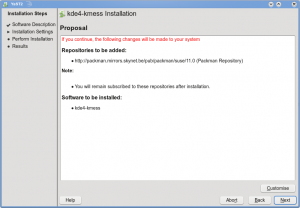
Click Next in the page showing KMess package selected and then click Next on the summary page showing repositories selected and click Next again on the installation summary page. This will start adding the required repositories and start installing the KMess package and the required dependencies.


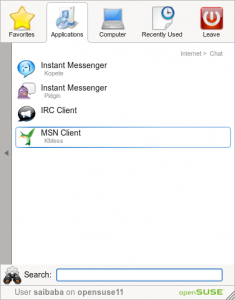
Once installed, you can find KMess can be found as “MSN Client” under “Application – Internet – Chat “
Click MSN Client to start and login with your MSN Messenger. You can choose to set you online status while signing on or after logging in from “Connect – My Status”


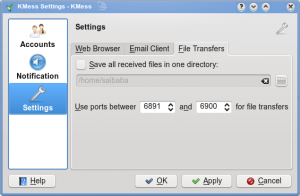
To edit Kmess settings, click “Actions – Configure KMess”

Click here to vist the homepage for KMess.
hi,
i have reading a lot about how linux community resources scattered all over the place (metaphorically speaking). It is obvious that developer of this program has talent and potential to do beautiful things, this is why i ask my self – why this is happening? why we have 100 different chat programs? i understand that it is all about choice, but when we have kopete which does essentially the same as kmess one would think why not join forces and make one better product. I would understand if there would be some essential difference between all these applications, but there is not. there are all the same – as of and result – chat.
Maybe I don’t understand it, if someone would explain me would be great.
Hi Niko,
When it comes to plain text it all looks the same indeed. (even KWrite and KWord look similar in that sense.. :p). But if you have more specific needs, you’ll either love KMess and dislike Kopete, or visa vera.
Both applications have a difference audience:
– Kopete is used by people who need to use multiple protocols.
– KMess is used by people who like to have an client optimized for *all* features of *one* protocol.
There are users coming from MS Windows who like to have an MSN client as they’re used to, and preferably better. This is what KMess offers, and it’s seriously a reason why people switch (or didn’t switch before).
I’ve contacted one of the Kopete developers at Akademy about sharing MSN protocol code. This is something I plan to work on mid-term (first priority will be getting a 2.0 release out). So yes, our work can benefit Kopete as well!
thank you Diederik for your responce.
niko
PS are you by any chance Dutch?
Hi Niko,
You’re welcome. I hope you found my answer regarding Kopete vs KMess satisfying.
Yes I’m indeed Dutch. 🙂
Hoi Diederik,
min nederlands is niet best, dus aub negeer mijn speling fouten 🙂
vandag heb ik geprobeerd in kopete mijn msn account in te stellen, maar ik blijf “wrong password” berichten te krijgen. dus ik heb toen gedacht lat even kmess proberen, dus even zypperen en …. zit in iedere geval mooier uit 🙂 maar ik krijg het zelfde fout melding. het ligt niet aan kmess (of kopete), maar ik dacht misschien heb je enige idee waroom kan het niet?
moet ik wel hier bij zegen dat met mijn zeer oude hotmail account (die ik niet meer gebruik, alleen als spam filter) ik kon wel makkelijk aanmelden, maar met hotmail account die ik heb vandaag aangemaakt heb ik deze probleem wel.
this link not work