OpenVAS, Open Vulnerability Assessment Server is a free opensource vulnerability assessment software released under GNU GPL lincese. OpenVAS is a fork of Nessus Vulnerability assessment software. Similar to the Plugin sets in Nessus, OpenVAS provides free Network Vulnerability Tests plugins that can be updated regularly.
OpenVAS needs for components installed on the server end namely
OpenVAS-Server: Core component of OpenVAS, which contains the functionality used for scanning a large number of target servers at a high speed.
OpenVAS-Libraries: This module contains functionality used by OpenVAS-Server.
OpenVAS-LibNASL: The NVTs are written in the “Nessus Attack Scripting Language” (NASL). This module contains the functionality needed by OpenVAS-Server to interface with NASL.
OpenVAS-Plugins: This module contains a base set of NVTs.
and then there is a OpenVAS Client to access the Open VAS server and run the scans.
The latest versions of OpenVAS do not have packages for any Linux Distribution. However, the previous versions of all the above components have the RPMs for openSuSE 10.2. I have to choose to use the source for the latest versions to install OpenVAS on my openSUSE 11.0
Install Pre-Requisites
Before we proceed to install the OpenVAS server, lets install the pre-requisites to successfully compile the OpenVAS Server components.
opensuse11:~ # yast2 -i gnutls libgnutls-devel pcap libpcap-devel bison gtk2-devel
Install OpenVAS Libraries
Download OpenVAS Libraries as follows
opensuse11:~ # wget http://wald.intevation.org/frs/download.php/467/openvas-libraries-1.0.2.tar.gz
Uncompress and untar the downloaded files
opensuse11:~ # tar -zxvf openvas-libraries-1.0.2.tar.gz
Change directory, compile and install OpenVAS Libraries
opensuse11:~ # cd openvas-libraries-1.0.2opensuse11:/openvas-libraries-1.0.2 # ./configure && make
opensuse11:/openvas-libraries-1.0.2 # make all
Add /usr/local/lib to /etc/ld.so.conf
opensuse11:/openvas-libraries-1.0.2 # vi /etc/ld.so.conf
and add the following line if it doesn’t exist
/usr/local/lib
Run ldconfig
opensuse11:/openvas-libraries-1.0.2 # ldconfig
This should install the OpenVAS libraries on your system.
Install OpenVAS libNASL
Download OpenVAS Libraries as follows
opensuse11:~ # wget http://wald.intevation.org/frs/download.php/468/openvas-libnasl-1.0.1.tar.gz
Uncompress and untar the downloaded files
opensuse11:~ # tar -zxvf openvas-libnasl-1.0.1.tar.gz
Change directory, compile and install OpenVAS Libraries
opensuse11:~ # cd openvas-libnasl-1.0.1
opensuse11:/openvas-libnasl-1.0.1 # ./configure && make
opensuse11:/openvas-libnasl-1.0.1 # make all
This installs libNASL on openSUSE.
Download and Install OpenVAS Server
The latest version of OpenVAS Server available for download has a problem with adding users to the system and this is fixed in the newer version on SVN. Hence, here we use the version from SVN instead of using the stable version available from download:
If you do not already have SVN installed, install as follows:
opensuse11:~ # yast2 -i subversion
Download the latest version from the SVN as follows:
opensuse11:~ # svn checkout https://svn.wald.intevation.org/svn/openvas/trunk/openvas-server
This downloads the files to openvas-server under the current directory. Change to the directory compile and install as follows
opensuse11:~ # cd openvas-server
opensuse11:/openvas-server # ./configure && make
opensuse11:/openvas-server # make install
That installs OpenVAS Server.
Download & Install OpenVAS Plugins
opensuse11:~ # wget http://wald.intevation.org/frs/download.php/464/openvas-plugins-1.0.2.tar.gz
Uncompress and untar the downloaded files
opensuse11:~ # tar -zxvf openvas-plugins-1.0.2.tar.gz
Change directory, compile and install OpenVAS Libraries
opensuse11:~ # cd openvas-plugins-1.0.2
opensuse11:/openvas-plugins-1.0.2 # ./configure && make
opensuse11:/openvas-plugins-1.0.2 # make all
That downloads and installs the latest plugins on your openSUSE.
Create OpenVAS SSL Certifcate
Create a OpenVAS Server SSL certifcate as follows:
opensuse11:~ # openvas-mkcert
——————————————————————————-
Creation of the OpenVAS SSL Certificate
——————————————————————————-This script will now ask you the relevant information to create the SSL certificate of OpenVAS.
Note that this information will *NOT* be sent to anybody (everything stays local), but anyone with the ability to connect to your OpenVAS daemon will be able to retrieve this information.CA certificate life time in days [1460]:
Server certificate life time in days [365]:
Your country (two letter code) [FR]: GB
Your state or province name [none]: London
Your location (e.g. town) [Paris]: London
Your organization [OpenVAS Users United]: SuseGeek——————————————————————————-
Creation of the OpenVAS SSL Certificate
——————————————————————————-Congratulations. Your server certificate was properly created.
/usr/local/etc/openvas/openvasd.conf updated
The following files were created:. Certification authority:
Certificate = /usr/local/com/openvas/CA/cacert.pem
Private key = /usr/local/var/lib/openvas/CA/cakey.pem. OpenVAS Server :
Certificate = /usr/local/com/openvas/CA/servercert.pem
Private key = /usr/local/var/lib/openvas/CA/serverkey.pemPress [ENTER] to exit
Add user to OpenVAS Server
To add a OpenVAS server
opensuse11:~ # openvas-adduser
Using /var/tmp as a temporary file holder.Add a new openvasd user
———————————
Login : openvasadmin
Authentication (pass/cert) [pass] :
Login password :
Login password (again) :User rules
—————
openvasd has a rules system which allows you to restrict the hosts that openvsduser has the right to test.
For instance, you may want him to be able to scan his own host only.Please see the openvas-adduser(8) man page for the rules syntax.
Enter the rules for this user, and hit ctrl-D once you are done:
(the user can have an empty rules set)Login : openvasadmin
Password : ***********Rules :
Is that ok? (y/n) [y] y
user added.
To remove a user at a later time use,
opensuse11:~ # openvas-rmuser <username>
Update the Network Vulnerability Test plugins
opensuse11:~ # openvas-nvt-sync
This syncs the NVT plugins to the latest on OpenVAS.
That’s all done.
Start OpenVAS Server
To start the OpenVAS server
opensuse11:~ # openvasd -D
To check if OpenVAS server is running
opensuse11:/usr/local # ps -ef | grep openvas
root 13519 1 0 20:26 ? 00:00:00 openvasd: serving 127.0.0.1
root 15002 1 0 20:42 ? 00:00:00 openvasd: waiting for incoming connections
The OpenVAS server starts and runs listening on TCP port 1241.
Install the OpenVAS Client
opensuse11:~ # wget http://wald.intevation.org/frs/download.php/466/openvas-client-1.0.4.tar.gz
Uncompress and untar the downloaded files
opensuse11:~ # tar -zxvf openvas-client-1.0.4.tar.gz
Change directory, compile and install OpenVAS Libraries
opensuse11:~ # cd openvas-client-1.0.4
opensuse11:/openvas-client-1.0.4 # ./configure && make
opensuse11:/openvas-client-1.0.4 # make all
This installs the OpenVAS Client under /usr/local/bin/.
To start the OpenVAS Client,
opensuse11:~ # OpenVAS-Client &
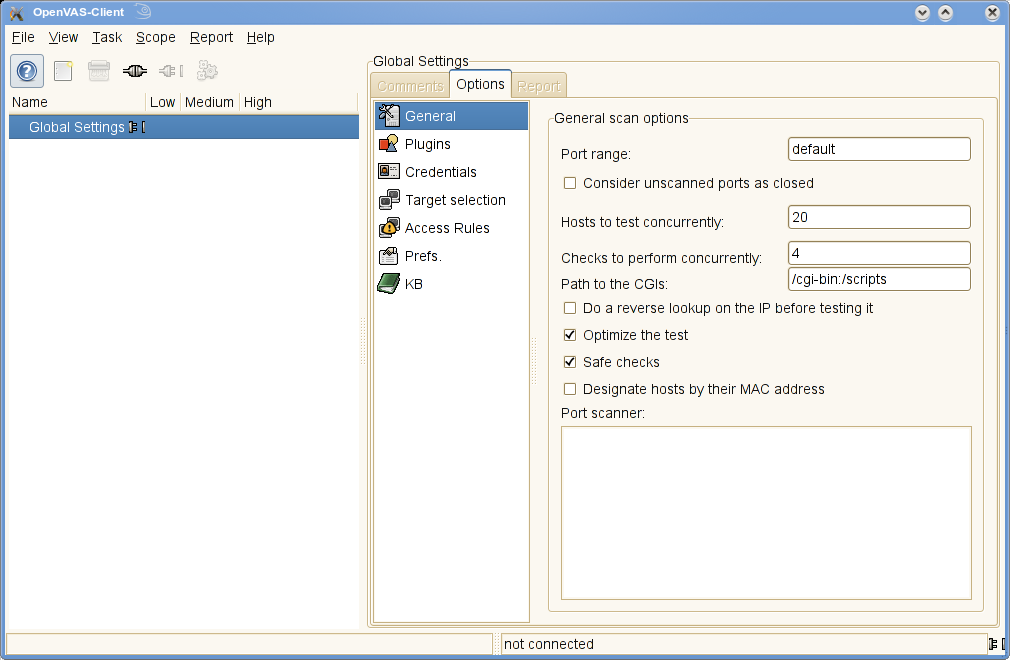
This launches the GUI. From File menu click Connect or use the “Connect” icon to connect to the server.
Enter the username and password that we just created to logon to the OpenVAS Server. Thats it you are logged.

Select or unselect your required plugins and click File – “Scan Assistant”. This will walk you through a small wizard to scan a target network or IP Addres s or a host (localhost here).

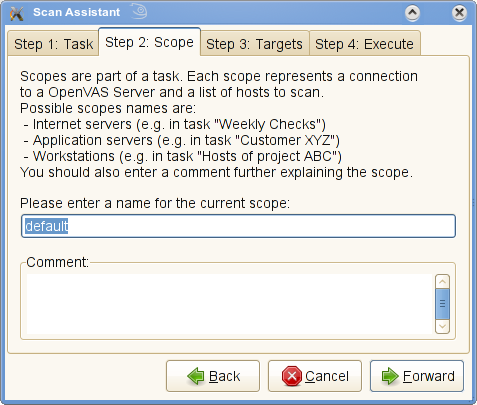
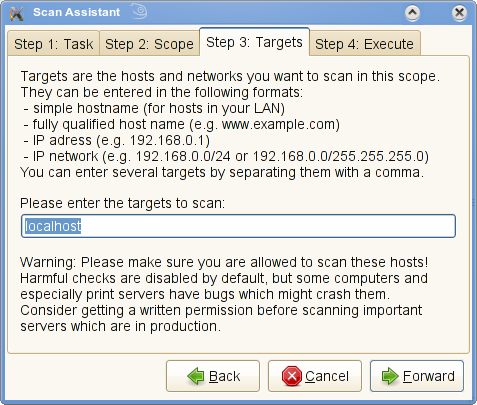

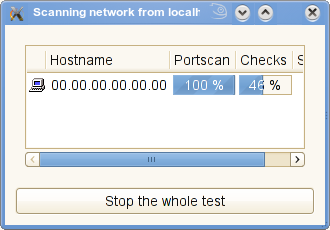
Once the scan is complete, checkout the report and you can see whats OpenVAS has found for you. You can use this client to connect to Nessus server as well.

Some useful paths and files:
Binaries
/usr/local/bin
/usr/local/sbinConfigs
/usr/local/etc/openvas
PIDs and logs
/usr/local/var
User accounts
/var/lib/openvas
A great tool and great alternative for the well known Nessus Vulnerability Assesment Scanner. To visit the homepage of OpenVAS, click here
Nice article, I’d never heard of this package before.
BTW, the openSUSE Build Service has packages available for OpenVAS.
There is no need to download and compile the stuff. RPMs are available
at http://download.opensuse.org/repositories/home:/bitshuffler:/openvas/openSUSE_11.0/repodata/
Note this is an open-source fork of Nessus, created after the latter closed its source.
It’s funny, once it’s gone everybody wants it.
The “official” reason of Nessus going closed source is the community. Apparently very few have contributed to (a) core and (b) NASL scripts… At the end it was obvious, according to the announcement way back, that there is no support from the community – one way in a two way street so to speak. Now that it’s gone, suddenly there is this big interest (I’ve seen few OpenVAS posts in the last few weeks).
I wonder if the project is going to die, again, soon.
As important as security is, remaining current with every development is hard, and evaluating possible vulnerabilities across a network can be quite a chore. You need a way to both automate tests and make sure you’re running the most appropriate and up-to-date tests. Open Vulnerability Assessment System (OpenVAS) is a network security scanner that includes a central server and a graphical front end. The server allows you to run several different network vulnerability tests (NVT) written in Nessus Attack Scripting Language (NASL), which OpenVAS updates frequently.
Over at our open source vulnerability scanning site, we formerly were running a Nessus scan. We have since switched to OpenVas since the Nessus licensing change.
Check us out, we are currently offering free vulnerability scans against your servers.
All the best for 2009!
HackerTarget.com
Hi,
I’m finding some issue while i run the command openvas-nvt-sync.It throws the error ->
sent 848073 bytes received 1503041 bytes 120569.95 bytes/sec
total size is 47546176 speedup is 20.22
Error: md5sums not correct. Your NVT collection might be broken now.
Please try this for details: cd “/usr/local/lib/openvas/plugins” ; md5sum -c “/usr/local/lib/openvas/plugins/md5sums” | less
Please do tell me what might be the reason for this.Also suggest me any alternatives to sync the plugins on the OpenVAS server.
regards
Kavitha
Hi,
this blog looks pretty good explained about OpenVAS. I installed OpenVAS on Debian (Raid Systems)(SERVER) nd trying to scan by giving the localhost address or any remote systems… The problem is the report which is getting as an output from openvas is only regarding PORT’s, i just wanted to know is it possible to scan based on application installed in the remote systems or is it possible to scan specific files which i needed to scan respectively.
please provide me the best solution for it, waiting for the earliest response.
my mail id: avinashvbhat@gmail.com
Thanking you,
Avinash Bhat
I found the application pretty easy to install when using ubuntu. I think this article helped a lot.
I do remember using it from time to time. I think the application works pretty well once you configure all of the parameters it asks.
I think this is something I will contribute to.
T
I’ve used Nessus (even recently), I’ve used Retina, I’ve used ISS and now and I’ve used OpenVAS recently.
Frankly, I LOVE ISS, but HATE the licensing cost. Retina is OK, but not the best, to be charitable.
When I look at Nessus today and I look at OpenVAS today, I’ll go 11 times out of 10 with OpenVAS. Its reporting is cleaner, more configurable and overall better formatted.
Now, if you’ll excuse me, I need to harangue the CentOs folks over one recent vulnerability and two 2009 vulnerabilities that remain unpatched in their distribution.