Claws Mail is a free opensource lightweight, user friendly and fast email client for Linux. Claws Mail is a quick response email client with easy configuration, intuitive operation and abundant features, extensibility, robustness and stability.
Apart from the normal standard features like Multiple email accounts, Filtering, MIME Attachments, etc there are some nice features including
GnuPG support (with GPGME) with ‘On-the-fly’ changing of the type of GnuPG encryption and/or signing used
User-defined headers
Multiple MH folder support
Mbox import/export
External editor
Message queueing and drafting
Plugin support for addon features and themes
Drag’n’drop support
Powerful Quick Search function
Dynamic signatures
For a detailed list of features click here
Install Claws Mail client
Claws Mail client can be installed using one of the following 1-click installs based on your openSUSE version.
openSUSE 11.0

openSUSE 10.3
openSUSE 10.2
NOTE: Click here to enable 1-click install in openSUSE 10.2
This should download the YaST MetaPackage file (YMP) and launch the YaST Package manager for installation. Click next on the window showing the selected repositories and next again on the package selection window and finally click Next on the installation proposal window. This should add the required repositories (click import when prompted to import the GPG Keys) and install ClawsMail and required dependencies. Click Finish when the installation is completed succesfully.


This installs Claws Mail under “Applications – Internet – E-mail” as “Email Client“. Click Email Client to launch for the first time.


When launched for the first time, Claws Mail takes you through a Setup wizard to setup your first email account. Click Forward on the Welcome Screen.
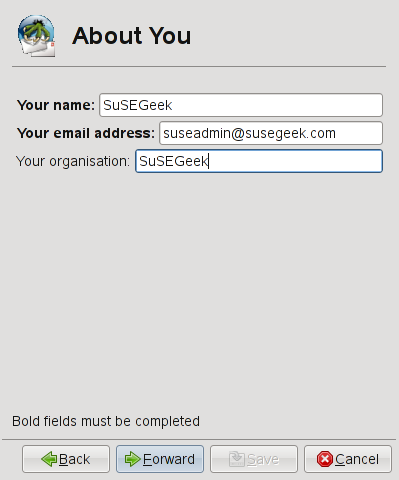
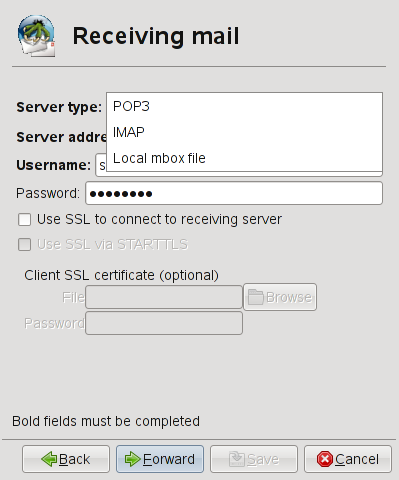
Enter your name, Email Address and the company name and click Forward. Enter the Server Type (IMAP,POP), Server Address, Username and password for receiving emails. Also enter SSL details if used and click Forward.


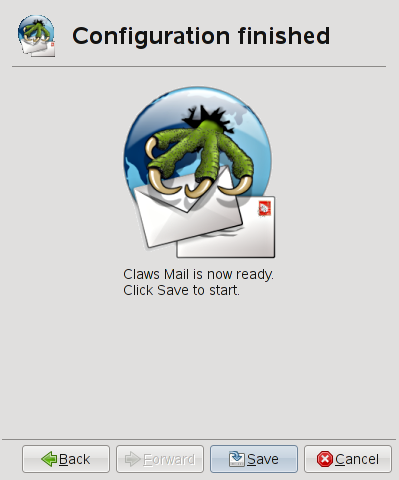
Now, configure the sending mail (SMTP) with the SMTP server and authentication details (if required) and click Forward. Enter the name for Mail box and click Forward. This completes the setup wizard and click Save

Configurations options for all email accounts globally or for speceific email accounts can be configured from the Configuration menu,

A couple of important features to discuss will be
Themes
As I said earlier, Claws Mail supports themes which can be downloaded from here and installed. Download the tar.gz files and extract it to your hard disk. Now, click “Configuration – Preferences”. Under Displa, click Themes and then “Install new”, select the extracted directory (Crystal here) and click “Use This”. This should install the theme and apply.

Claws Mail Plugins
Plugins allow users to extend the capability of Claws Mail with addon features. You can find the available plugins here
However, you can use one of the following 1-click installs based on your openSUSE version to install all the plugins available in the above URL.
openSUSE 11.0
openSUSE 10.3
openSUSE 10.2
Once installed all the plugins (files with .s0 extension) are found under /usr/lib/claws-mail/plugins (/usr/lib64/claws-mail/plugins on x86-64). Click Configuration – Plugins and click Load and select the Plugin and click OK. This will install the plugin.

A nice simple email client for Linux. Click here to visit the project homepage.
I’ve been using claws-mail for awhile on Ubuntu, and it is by far my favorite e-mail client. Loads very quickly, does what it needs, very stable. Blows bloated and clunky Thunderbird and Evolution mail out of the water.
Hi! i am a frequent reader of your blog and would like to tell that your blog is the best of all!!
Generally Ido not post on blogs, but I would like to say that this post really forced me to do so! really nice post.
Very informative article, which I found quite useful. Cheers ,Jay
Great article. I will link back from my site. Please post more often if you have time. Thanks!
that was make me impressive reading your content, i hope i can find other usefull information on your blog, thanks!
Hello Guru, what entice you to post an article. This article was extremely interesting, especially since I was searching for thoughts on this subject last week.
Thanks for the great review — too bad Claws does not use the standard .mbox format for local storage. Is there any advantage of their MH format over mbox?
Is there any advantage of their MH format over mbox?
MH…. Long ago when workstations had 8 or 16 megs of memory, command line tools ruled, and MH (now nmh) lets you “grep,” read, reply to and compose mail from the command line.
Overwhelmed sysadmins will tell you that MH can delete more messages in less time than any other mail client.
MH used the “one message per file” format, for pretty obvious reasons. (it is just a bunch of scripts.)
I recall that mhonarc and other tools would convert the messages to HTML format, so that back in the days before webmail, you could read your messages with a browser, and with a little bit of scripting, reply as well.
An early GUI version of MH was exmh, written in tcl/tk.
Now you can get 4GB of memory for under $20.
I think your blog need a new wordpress template. Try searching for free premium wp theme downloads
Thanks for the added info, is always good to learn. Thanks again
Claws Mail is a good ,user friendly and fast email client for my debian box.Thank you!
Hello!! just want to give you a shoutout, you are the greatest!