Google Chrome is the new cool faster browser that has been around and making news for a while but only on Windows until recently they finally released the Linux version of the browser. With google chrome browser slowly gaining traction and acceptance among general internet users, the browser has also evolved from being a simple raw fast browser with features like themes and extensions that made Firefox so very popular and more web app integration.
Install Google Chrome in openSUSE
Google has released RPM files for openSUSE on 32-bit and 64-bit architecture. Installation of Google Chrome in openSUSE is a simple 2 step procedure where we install Linux Standard Base Core (LSB) package and the Google Chrome package itself.
Install lsb
To install Linux Standard Base Core (lsb) package, run the following command:
opensuse:/home/sai/Download # yast2 -i lsb
Once installed, download Google Chrome RPM package for openSUSE from here by selecting the 32-bit or 64-bit version and click “Accept and Install” to accept the terms of service.
Once downloaded, run the following command to install Google Chrome browser:
opensuse:/home/sai/Download # yast2 -i google-chrome-stable_current_x86_64.rpm
This should install Google Chrome browser under /opt/google/chrome/ directory.
Now, you can start Google Chrome for the first time by running the following command:
opensuse:/opt/google/chrome # /opt/google/chrome/google-chrome
Also, you can add to your desktop by right-click and select “Create New” – “Link to application”

1. Click the “Application” tab, and enter a name, description and enter command as “/opt/google/chrome/google-chrome”

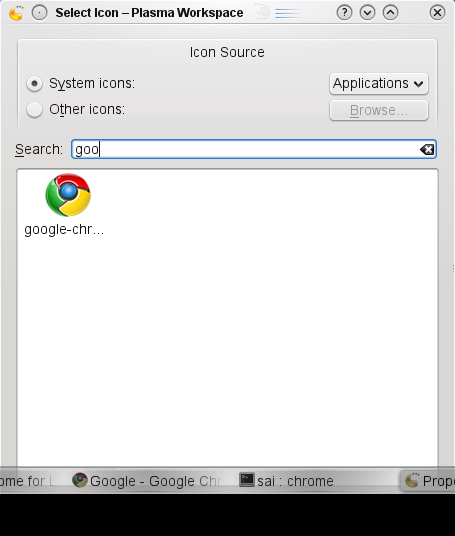
2. Click “General” tab and click the icon and search for google to click and select the Google Chrome browser icon and click OK.
This should add Google Chrome browser to desktop. Click the Google Chrome icon to launch for the first time and choose options like import settings from Firefox and make Google Chrome as the default browser etc if you want to and continue. There you have your Google Chrome browser up and running.

Happy browsing!!! Hope we soon have a 1-click installer for Google Chrome browser in openSUSE
You can add the following repository to your repo list :
http://dl.google.com//linux/rpm/stable/x86_64
and install chrome and all its dependencies from yast/zypper
Sagi.
Or
http://dl.google.com/linux/rpm/stable/i386
if you are not on 64 bit.
Best regards,
Steffen
we have a really nice package of chromium in Contrib repository, which is built completely from sources with compiler flags we want, has video tag support and other extra features that will appear in Chrome later, integrates well with the rest of the system and still there are people that use Chrome. I wonder what we are doing wrong. Is it a bad marketing of Contrib repo or people just don’t care about using binary package from 3rd party vendor even when there is a better alternative?
I would say marketing is the biggest issue and misunderstandings. For awhile I was using the Chromium builds while Chrome was still in the early phases of it’s Linux release. I switched to Chrome after the official release believing it would be more stable and assuming Chromium, which I had seen some issue with, was a bit unstable in comparison. I’ve had good luck with Chrome since so never went back to look at Chromium, but this post has prompted me to do so.
Please state what version of SuSE you are using as the package lsb 3.2.x is only available on certain versions of SuSE. I’m using 11.0 and it’s not available in the mainstream, or I haven’t found it yet. But be aware that Chrome’s dependency is for lsb 3.2 or higher.
@Pavol Rusnak: I figured Chromium is the development branch and Chrome is what comes out when a snapshot of Chromium is assumed to be stable. I’m not too thrilled about using a development version.
@ Pavel: I’ve searched software.opensuse.org/search for “chrom”, found “chromium”, installed it via one-click from contrib, and am happy with it. You’re doing good work!
@Pavol I’m also fine with Chromium@Contrib and using it writing this… thanks for your work!
Yeah, this is all wonderful, except it doesn’t work unless you are logged in as root. How do you install chrome to your personal directory tree as a regular user?
@John I would try to chroot it. (I’m not very familiar with chroot, though – it’s possible that you’d need root privileges to set it up in the first place, and if you could do that then you could surely just install chrome directly?)