AcetoneISO2, is a feature-rich and complete software application to manage CD/DVD images. Thanks to powerful open source tools such as fuseiso, AcetoneISO2 will let You mount typical proprietary images formats of the Windows world such as ISO BIN NRG MDF IMG and is more than a simple ISO mount software.
Features include,
Automatically mount ISO, MDF, NRG, BIN, NRG images
A nice display which shows current images mounted and possibility to click on it to quickly reopen mounted image
Convert all image types to ISO format. Anything from bin mdf nrg img daa dmg cdi b5i bwi pdi and more
Extract contents of any of the images to a folder:
Play a DVD Movie Image with Kaffeine / VLC / SMplayer with auto-cover download from Amazon
Generate an ISO from a Folder or CD/DVD
Check MD5 file of an image and/or generate it to a text file
Encrypt / Decrypt an image
Split / Merge image in X megabyte
Compress with High Ratio an image in 7z format
Rip a PSX cd to *.bin to make it work with epsxe/psx emulators
Restore a lost CUE file of *.bin *.img
Convert Mac OS *.dmg to a mountable image
El-Torito support to create ISO bootable Cd
Mount an image in a specified folder from the user
Supports UDF ISO filesystem images
Create a database of images to manage big collections
Extract the Boot Image file of a CD/DVD or ISO
Backup a CD-Audio to a *.bin image
Service Menu for Konqueror and D3lphin
Rip a DVD and/or convert videos (avi, mpeg, mov, wmv, asf) to Xvid AVI
Convert a FLV video to AVI
Download videos from Youtube!
Install Acetoneiso2
To install Acetoneiso2 on your openSUSE, click one of the following 1-click installer (YaST MetaPackages) based on your openSUSE version. This will automatically download the YMP file and launch YaST Package Manager.
openSUSE 11.0

openSUSE 10.3
openSUSE 10.2
NOTE: To enable 1-click install feature in openSUSE 10.2, click here
Click Next in the page showing Repository selected and then click Next on the page showing Acetoneiso2 package selection and click Next again on the installation summary page. This will start adding the required repositories and start installing the Acetoneiso2 package and the required dependencies.


Once installed, you can find Acetoneiso2 can be found under Application – Utilities – More Programs as “a CD/DVD Image Tool”
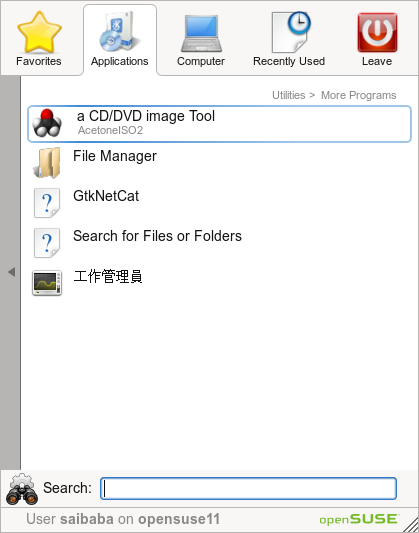
Click on the menu item to start the application and you can see the simple and easy to use menu items without much of complexity for the level of features in unveils.
Click Mount to select and mount an image file.

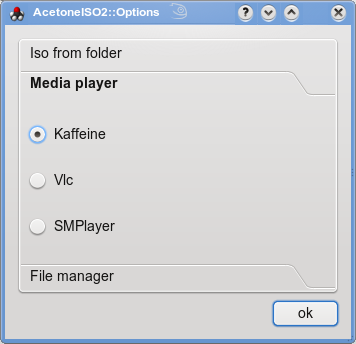
If you want to play a DVD movie from a DVD ISO image, click the play tab. This uses the default player on your openSUSE. However, you can change this from File – Options. Also, can change the “File Manager” and “ISO from folder stettings”

To use the features like Mounting UDF ISO, Encrypt.Decrypt images, Compress Images, Split Images, MD5 generate/check, Cue for BIN/ISO images, click Utilities menu

To convert image formats or to generate ISOs, Extract contents from ISO or RIP a PSX1 game, click the Conversion menu
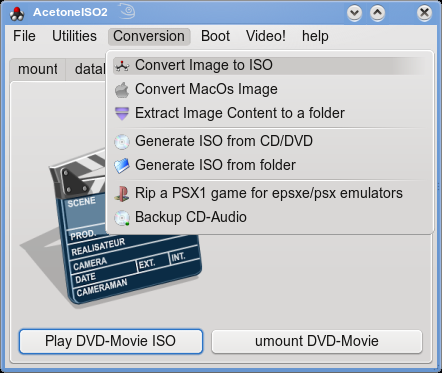
To extract Boot images click Boot menu

Now comes the interesting option to RIP/Conversion of video formats, click the Video menu for your choice

A new version with frontend and more features is on the making…so watchout this space..
For more information, visit the authors website here
Excellent tool and a good bundle of options that was missing until now! Thanks for this! 🙂 Would be awesome if there would also be a gnome interface 🙂
Cheers,
Wj
Fantastic tool! Create and use ISO over linux OpenSuse ! Tks!
Thanks for the guide. QUite a few of my precious dvd are getting scratched, so time to make some backups!
Nice write-up, thanks. I really like the screen shots.
Here’s a question for you – what’s the best option for DVD Upconversion in Suse? Any thoughts?
Thanks!
the link for suse 11 isn’t working…. i don’t know why? any manual installation methods… i am new to linux…..sorry…for ….that….